Every referral looks different
Referrers use different forms, document orders, labels and levels of detail.
Product overview
Elvra brings incoming referral documents into one workflow that recommends what should happen next, shows the supporting evidence and manages the approved action through handoff.
Referral management
Referral management software helps healthcare teams receive, organize, review, approve and track referrals from arrival through the next action and handoff. For specialty care, the goal is a clear action—booking, missing-information follow-up, routing or another configured outcome—with the evidence and ownership needed to carry it out.
Why it is difficult
Specialty referrals rarely arrive as uniform, complete records. Forms, handwritten notes, reports and attachments come from different sources, in different formats and often at different times, yet the receiving team still has to decide what should happen next.
Referrers use different forms, document orders, labels and levels of detail.
New reports, notes and attachments may appear after the initial referral.
The information needed for review changes by referral question, specialty, service and the specialization or preferences of the receiving physician.
Intake staff, reviewers, clinicians and booking teams may each own a different step.
Referral intake
Elvra receives referral documents by direct upload, e-fax or a connected EHR. It can process typed documents, handwritten notes and long-form unstructured text. New documents can be added to the same referral later.
What changes
The receiving team starts with organized information instead of repeatedly reconstructing the package.
AI-assisted triage
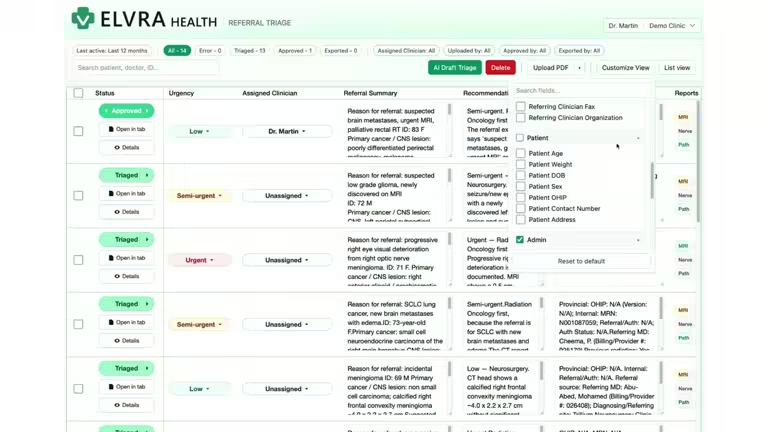
Elvra applies specialist medical knowledge to identify findings that matter for the referral indication, distinguish them from background information and recommend the next action. It does not simply repeat the sender’s urgency label.
Human review and approval
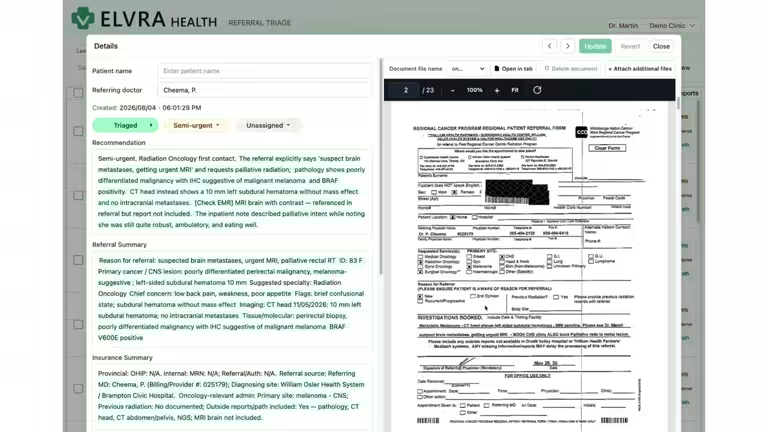
Authorized reviewers inspect the source, confirm the relevant information and resolve open questions before approving the action. The triage draft shows the work behind the recommendation; your team controls the decision.
Referral tracking and follow-through
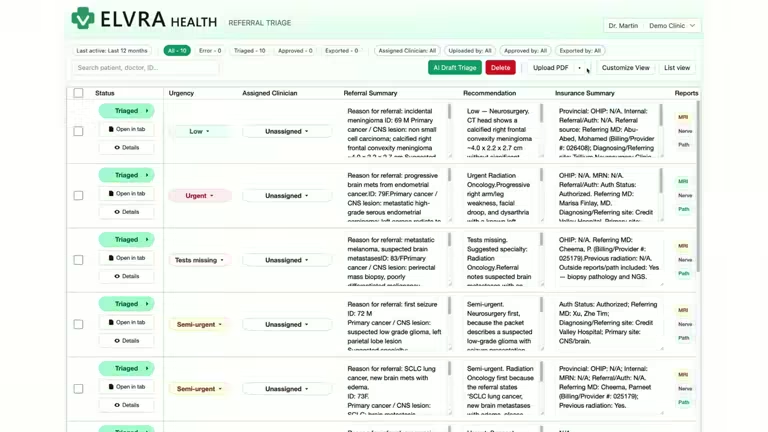
Search and filter referrals in real time so staff can quickly find the approved action, status, owner and discussion while answering patients or referring clinics.
Where Elvra fits
Elvra connects document intake to a source-linked recommendation, human approval and operational follow-through.
Receiving a document is only the start. Elvra organizes the referral around the decision the team needs to make.
Elvra identifies relevant findings, recommends an action and shows the reasoning behind it.
Start with direct intake or connect e-fax, EHR and SMART on FHIR workflows.
Fast-start onboarding
Begin directly in Elvra without waiting for an integration.
See transparent pricing →Connected onboarding
Connect e-fax, EHR, SMART on FHIR and identity workflows when your organization needs them.
Explore integrations →Product tour
Watch the one-minute walkthrough to see incoming work, source-linked reasoning and the approved action in the current product.
Common questions
Yes. Direct intake is the fastest way to start. A clinic can be onboarded in minutes without waiting for an EHR or e-fax integration.
No. Elvra suggests what should happen next and presents the supporting information in an editable, source-linked draft. Authorized people verify the evidence and approve the action.
The direct intake option can be set up and users onboarded in minutes.
Yes. Elvra supports e-fax and EHR integration, including SMART on FHIR where supported by the customer’s environment.
Watch the product walkthrough or book a demo to talk through your referral workflow.